Repository navigation
Bug - Drawer - resizable DrawerPanelContent calls a stale onResize after a mouse/touch drag #12691
Description

In a resizable DrawerPanelContent, ending a mouse or touch drag on the splitter calls the onResize prop from the panel's first render, not the current one.
The document-level mousemove/mouseup/touchmove/touchend listeners are created with useCallback(handler, []), so they keep the first render's handlers for the life of the component. That freezes the onResize, id, position and isInline values they read. Any consumer that passes an inline onResize closing over state (the common pattern) gets an out-of-date callback on every drag.
The keyboard path (arrow keys, then Enter/Escape) is not affected. It reads the current props on each key press and reports the correct width, but it has no test coverage. An earlier version stored the width in a plain let currWidth in the component body, which reset on every render and made Enter report a width of 0.
Affected component: DrawerPanelContent (packages/react-core/src/components/Drawer/DrawerPanelContent.tsx).
How do you reproduce the problem?
const Repro = () => {
  const [count, setCount] = useState(0);
  return (
    <>
      <Button onClick={() => setCount(count + 1)}>Rerender ({count})</Button>
      <Drawer isExpanded isInline>
        <DrawerContent
          panelContent={
            <DrawerPanelContent
              isResizable
              defaultSize="300px"
              onResize={(_e, width) => console.log('count when onResize was created:', count, 'width:', width)}
            >
              Panel
            </DrawerPanelContent>
          }
        >
          <DrawerContentBody>Content</DrawerContentBody>
        </DrawerContent>
      </Drawer>
    </>
  );
};- Click Rerender a few times, so
countis 3 for example. - Drag the splitter and release it.
- The console logs
count when onResize was created: 0, which is the callback from the first render. - Focus the splitter, press ArrowLeft, then Enter. This logs the current
countand the correct width.
Expected behavior
Ending a drag calls the current onResize prop (and uses the current id and position) with the panel's resized width, the same as the keyboard path does.
Is this issue blocking you?
Workaround: pass a stable onResize (for example useCallback with no dependencies) that reads the latest state through a ref.
Screenshots
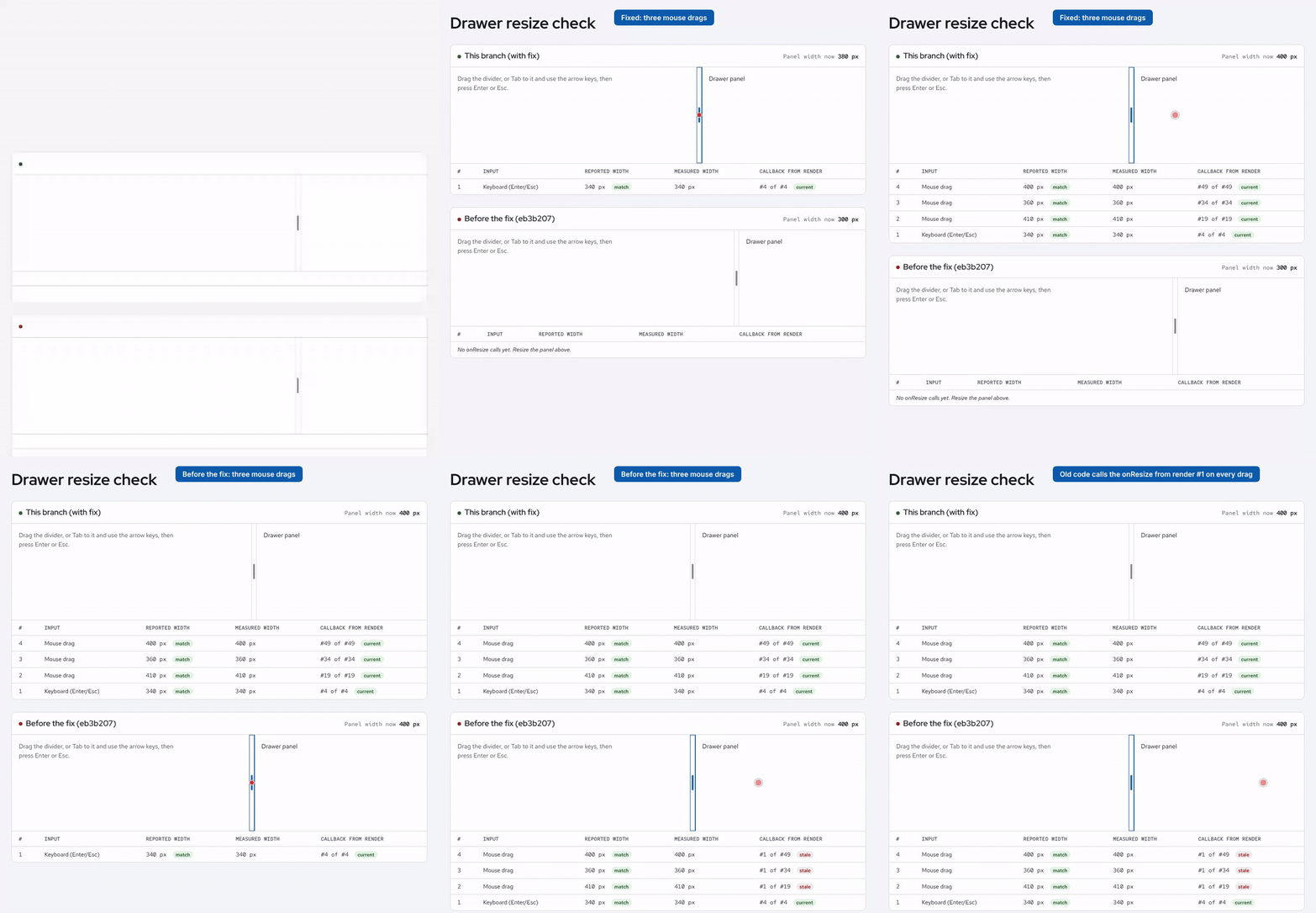
Top: a fix where the listeners delegate to the latest handlers through a ref. Bottom: current main. Each table row is one onResize call. "Callback from render" shows which render created the callback that ran. On main, every drag runs the callback from render #1.
What is your environment?
- OS: Linux
- Browser: Chromium (also reproduced in jsdom with React Testing Library)
- Version: @patternfly/react-core 6.7.1-prerelease.0 (
mainat eb3b207)
What is your product and what release date are you targeting?
N/A
Jira Issue: PF-4744
Activity
coderabbitai commentedon Oct 24, 2026
🔗 Related PRs
#12690 - fix(Drawer): call latest onResize from resizable panel mouse/touch handlers [open]
📝 Issue Planner
Check the box below or use the
@coderabbitai plancommand to generate an implementation plan and prompts that you can use with your favorite coding assistant.🧪 Issue enrichment is currently in open beta.
You can configure auto-planning by selecting labels in the issue_enrichment configuration.
To disable automatic issue enrichment, add the following to your
.coderabbit.yaml:💬 Have feedback or questions? Drop into our discord!