Repository navigation
[iOS] Multiline TextInput loses its custom font face for text typed after an autocorrect #59157
Description

Description
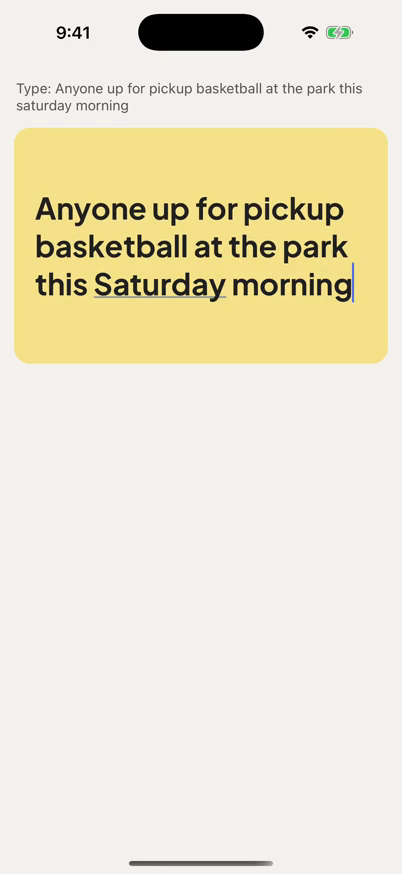
On iOS, a multiline TextInput whose fontFamily is a bundled custom face (PlusJakartaSans-Bold, shipped with PlusJakartaSans-Regular) draws the words typed after an autocorrect in the family's regular face. The text before the correction and the corrected word stay bold. Every word typed after it is regular.
Expected: all of the text stays in PlusJakartaSans-Bold.
The same autocorrect also breaks the field's height. In our app the field also sets letterSpacing: 0 and runs React Native 0.86.3. The visible text stays bold, but the field is laid out one line short of what the UITextView draws, so the last line is hidden below the field: onLayout reports 114 while onContentSizeChange reports 152. Setting autoCorrect={false} avoids both, and so does typing without triggering an autocorrect. With the system font and fontWeight: '700' the text stays bold.
Steps to reproduce
- Clone the reproducer, then run
cd ReproducerApp && yarn && cd ios && bundle install && bundle exec pod install && cd .. && yarn ios(iPhone 17 Pro simulator, iOS 26.5, hardware keyboard). - Tap the field and type, without pausing:
Anyone up for pickup basketball at the park this saturday morning - iOS autocorrects "saturday" to "Saturday" when the space after it is typed.
- "morning" is drawn in
PlusJakartaSans-Regular.
React Native Version
0.88.0
Affected Platforms
Runtime - iOS
Output of npx @react-native-community/cli info
System:
  OS: macOS 26.6.2
  CPU: (10) arm64 Apple M4
  Memory: 270.50 MB / 16.00 GB
  Shell:
    version: "5.9"
    path: /bin/zsh
Binaries:
  Node:
    version: 22.23.2
    path: ~/.pixi/envs/default/bin/node
  Yarn: Not Found
  npm:
    version: 10.9.8
    path: ~/.pixi/envs/default/bin/npm
  Watchman: Not Found
Managers:
  CocoaPods:
    version: 1.17.0
    path: /opt/homebrew/bin/pod
SDKs:
  iOS SDK:
    Platforms:
      - DriverKit 25.5
      - iOS 26.5
      - macOS 26.5
      - tvOS 26.5
      - visionOS 26.5
      - watchOS 26.5
  Android SDK: Not Found
IDEs:
  Android Studio: Not Found
  Xcode:
    version: 26.6/17F113
    path: /usr/bin/xcodebuild
Languages:
  Java:
    version: 17.0.18
    path: /usr/bin/javac
  Ruby:
    version: 4.0.6
    path: /opt/homebrew/bin/ruby
npmPackages:
  "@react-native-community/cli":
    installed: 20.2.0
    wanted: 20.2.0
  react:
    installed: 19.3.0
    wanted: 19.3.0
  react-native:
    installed: 0.88.0
    wanted: 0.88.0
  react-native-macos: Not Found
npmGlobalPackages:
  "*react-native*": Not Found
Android:
  hermesEnabled: true
  newArchEnabled: true
iOS:
  hermesEnabled: true
  newArchEnabled: true
Stacktrace or Logs
No crash or error is logged.
MANDATORY Reproducer
https://github.com/peytonshields/rn-textinput-autocorrect-font
Screenshots and Videos
After typing the steps above, "morning" is in the regular face:
Recording: https://github.com/peytonshields/rn-textinput-autocorrect-font/blob/main/media/repro.mp4
Activity